
The short answer. Your McKinsey Solve invitation email is the source of truth for your assessment: McKinsey's August 2025 Solve FAQ says it states your assessment length, and the deadline in the same email is the only one that applies to you (if you need more time, see how to ask for an extension). McKinsey publishes no standard completion window, invitation rate or pass rate. Circulating, unverified figures put the window at about 5 to 7 days and the share invited at 80 to 90% of those who pass a CV screen, although other figures give 60 to 70% of applicants. An invitation does not guarantee an interview; for every later stage, see the McKinsey Solve timeline.
| Question | Answer | Status |
|---|---|---|
| Assessment length | Stated in your invitation email; 65, 85 or 95 minutes reported in 2026 | Official McKinsey Solve FAQ, August 2025 (lengths as reported) |
| Time to complete | About 5 to 7 days; one to two weeks | Unverified no McKinsey standard |
| Share invited | 80 to 90% after a CV screen; 60 to 70% of applicants | Unverified no source given |
| Rescheduling | Not described in the FAQ; ask your recruiter | Official McKinsey Solve FAQ, August 2025 |
Does everyone get a McKinsey Solve invitation?
The current official public sources reviewed for this guide do not publish a universal invitation rate or establish that every applicant receives Solve. Some individual recruiting programs may tell their applicants that they will receive Solve, but that does not create one McKinsey-wide rule. Candidates report that in most offices an invitation means your CV already passed a recruiter screen; McKinsey does not confirm that, and the order varies by region, role and channel. The unverified 80 to 90% figure circulating on prep sites refers to candidates who have already passed that screen; another unverified figure gives 60 to 70% of all applicants instead. Whether the route differs for experienced hires is covered below, MBA timing in the Solve timeline, and the route table below shows who is reported to receive Solve.
Who is reported to receive Solve by application route?
Candidates describe Solve invitations across several McKinsey application routes, with no invitation policy by role, school, experience level or office behind them. The table is a map of reported situations, not a forecast or an eligibility checklist.
| Application route | What is reported | What to conclude |
|---|---|---|
| Business Analyst and other early career consulting roles | Reported Applicants describe receiving Solve after applying. | Prepare for the possibility; do not assume an email is automatic. |
| Associate and MBA recruiting | Reported Applicants describe invitations on these routes too. | Your program's instructions matter more than another applicant's sequence. |
| Experienced hire consulting | Reported Both Solve requests and routes without one appear. | Ask the recruiter which assessment applies to your role. |
| Internships and specialist roles | Reported Patterns vary by program and role. | No universal exemption or requirement is published. |
| Referral or direct interview route | Reported Some describe interviews without Solve; others dispute exemptions. | A referral alone does not prove you will skip Solve. |
The table helps you form one question for the recruiter: “Is Solve part of the assessment sequence for my role and recruiting cycle?” It cannot answer that question on the recruiter's behalf.
Can some applicants bypass McKinsey Solve?
The official sources checked October 11, 2026 list no Solve exemptions; stories about referrals, seniority, specialist work and particular offices bypassing it are unverified, and they conflict with each other. If you receive a direct interview invitation, follow it. If you receive Solve, follow that invitation. If neither arrives by a date you were given, ask the recruiter which stage applies.
Does no Solve invitation mean McKinsey rejected you?
No Solve invitation yet does not prove McKinsey rejected you; the official Solve page and FAQ publish no invitation timetable or rule that silence equals a decision. A missing message can mean your application is still under review, that your route uses a different sequence, or that an email was missed. An explicit application status or a message from the recruiter is better evidence than silence.
When to contact the recruiter. Contact the recruiter when a date they gave you has passed or your instructions are unclear; McKinsey's Solve FAQ sends non-technical questions to the recruiter but gives no universal follow-up day. First check the portal and spam folder so your note can name what you have already checked. A useful note is specific: “I applied for the Associate role in the Paris office, and my application still shows under review. My confirmation mentioned an update after the application window. Should I expect a Solve invitation for this route, or is there another next step?” Replace those details with your own. Technical support handles a link you already hold; it cannot tell you whether an invitation is coming.
How long do you have, and how many people get Solve?
No completion window or invitation rate is official, so every circulating number is unverified: 5 to 7 days or one to two weeks to complete, 80 to 90% or 60 to 70% invited, and about 20 to 30% moving on. Each is listed below as reported, followed by what we could check.
- Time to complete
- 5 to 7 days, strictCandidate account, June 2026; a window of 5 days was described as strictly applied
- Usually 1 to 2 weeksCirculating figure, 2026, no source given
- Share invited
- 80 to 90%of candidates who pass resume screening, circulating figure, no source given. Other figures give 60 to 70% of applicants instead, so the figures disagree with each other
- Not automaticCandidate account, June 2026: in most offices the invitation follows a CV screen
- Wait to receive it
- About 1 weekCirculating figure, June 2026, unverified
- 1 to 3 weeks, in batchesCandidate account, April 2026; some regional offices take several weeks
- Share who move on
- About 20 to 30%Seen in candidate accounts and in circulating posts. Neither cites McKinsey data
Sources read October 3, 2026. Candidate answers are anecdotes and the other figures carry no source, so none of these is a rule for your application.
What we could verify. McKinsey's August 2025 FAQ says your invitation email states your assessment length; neither the FAQ nor the Solve page publishes a completion window, invitation rate or pass rate. What we read is consistent with a window of about a working week, with one involving five days. Our timeline guide lists the dated reports we used. We found no source for the 80 to 90% or 60 to 70% figures or the one-to-two-week window, and the "CV already passed" reading is a pattern, not a policy. For what the 20 to 30% figure can and cannot tell you, see McKinsey Solve pass rate.
What should you do in the first 24 hours after a McKinsey Solve invitation?
In the first 24 hours after a McKinsey Solve invitation, note the deadline in local time and the stated length, run the technical check, pick a start slot at least a day before the deadline, raise any clash with your recruiter, and take one untimed look at each game. With five days or fewer, the first day decides whether the rest is preparation or panic.
- First hourRead the email for facts, not reassurance
Write the deadline in your local time, note the stated length (65, 85 or 95 minutes tells you which games to expect), and save the support contact.
- Same dayRun the technical check
McKinsey's FAQ says to work alone without outside tools, and advice circulating online is a laptop or desktop, not a phone. Find out now if your machine or connection fails, while there is time to fix it (see McKinsey Solve system requirements).
- Same dayPick your start slot
Choose a slot at least a day before the deadline, with a block comfortably longer than the stated length for the untimed tutorials.
- Same dayRaise any clash with your recruiter
Exams, travel or an accommodation need: email today, before you start. A support ticket does not move a deadline.
- EveningOne untimed look at each game in your version
Then rank your games from weakest to strongest; the remaining days go to the weakest first.
Our editorial checklist, not a McKinsey schedule. If your window is a week or more, the same steps apply with less urgency.
For the days after that, the 7, 3 or 2 day prep plan allocates time by game.
For dated steps selected for your invitation, Road to Offer's free Solve plan asks for your invitation length and test date. Create a free account to view and save the plan, which covers up to 28 preparation days with practice, guides and a final checklist. The plan itself is free; paid practice and Learning mode have separate access requirements.
How long after applying does an invitation arrive?
No single universal invitation timeline is published. Office, role, program and recruiting cycle can change the sequence. Follow the timeline in your application confirmation or portal, check your spam folder, and contact your recruiter if a date they gave you has passed. Another candidate's wait is not evidence about your application.
What details should you pull from your McKinsey Solve invitation?
Pull four details from your McKinsey Solve invitation: the sender and link, the deadline and its timezone, the stated duration, and the support route. The teaching diagram below is invented. It is not a real invitation or a reconstruction of one. It marks three of the details worth extracting from your own email; the table below adds the fourth, the sender.
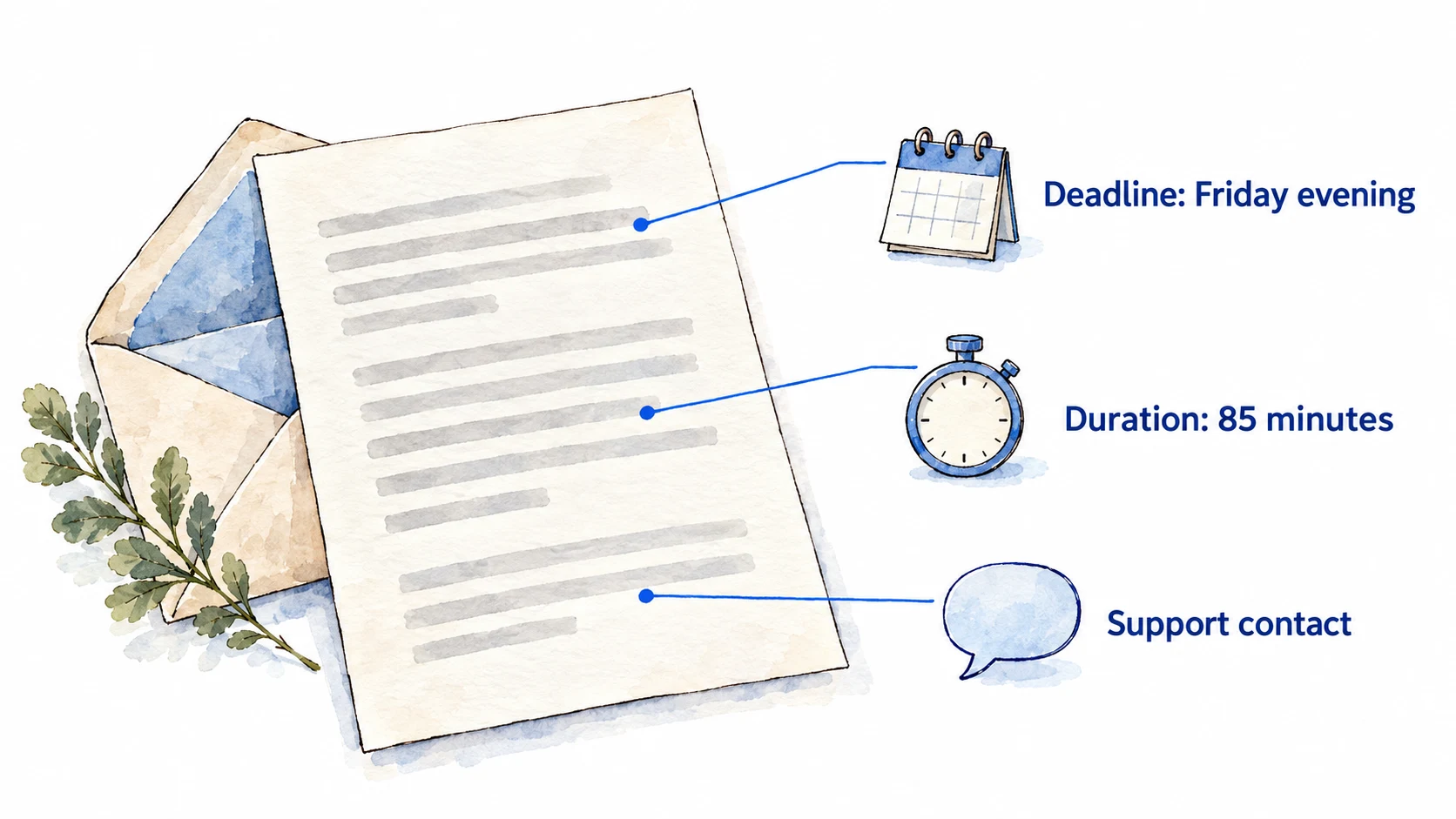
On small screens, scroll the table horizontally to compare all columns.
| Invitation detail | What it tells you | What it does not prove | Your action |
|---|---|---|---|
| Sender and link | Where your personal assessment starts | That a forwarded or copied link is safe | Verify the sender and keep the link private |
| Deadline and timezone | Your stated completion cutoff | How long the assessment lasts | Convert the deadline into local time in writing |
| Stated duration | The uninterrupted block to reserve | A guaranteed module list | Add setup margin and follow named modules, if any |
| Support route | How to report an assessment fault | An automatic deadline extension or retake | Save it before starting |
Is the McKinsey Solve deadline the same as its duration?
No. The McKinsey Solve deadline is the calendar cutoff for completing the assessment, and the duration is how long the assessment takes once started; candidates also confuse timezone, tutorial time and what the invitation promises.
- Deadline vs. duration. The deadline is the calendar cutoff for completing the assessment. The duration is how long the assessment itself takes once started. Plan a start time that leaves setup margin before the deadline, not exactly at it.
- Timezone. Convert the stated deadline into your local time in writing, then double check the conversion. Ask your recruiter about deadline questions; do not assume an extension.
- Duration vs. tutorial. Each task begins with an untimed tutorial, according to the current official FAQ. Tutorial time is for learning the interface of that task, so use it for that purpose rather than rushing through. Do not assume whether your invitation's duration includes tutorial or setup time; leave extra margin and clarify anything ambiguous.
- Invitation vs. interview. Receiving Solve is not proof that an interview will follow. McKinsey considers Solve performance alongside the rest of your application, so the invitation itself promises no interview.
Can you get an extension to the McKinsey Solve deadline?
There is no published Solve deadline-extension policy or guaranteed grace period; for an exam, travel, illness or other non-technical conflict, its official FAQ directs you to your recruiter. A recruiter can tell you what applies to your invitation, but no public source predicts whether a request will be approved. Ask before your cutoff where possible, state the conflict briefly, and propose a specific time you could complete the assessment.
- Official: non-technical questions go to your recruiter; accommodations exist for a disability, health condition or specific learning difficulty; for a technical fault, support may give extra time or reset the link, depending on the issue; a fault you never reported to support earns no reset exception.
- Not published: whether an extension request is approved and on what grounds, any grace period after the cutoff, and how long a recruiter takes to answer.
The support remedy is about an issue support can diagnose, not a published right to move a calendar deadline for an exam or travel. A request is not approval: until your recruiter confirms a change, plan around the deadline already sent to you. For an accommodation, see the accommodations guide.
What should you say when asking your recruiter for more time?
McKinsey gives no official email template for a Solve extension, so send a short request with your invitation deadline, the non-technical conflict, a feasible alternative, and a request for confirmation before you rely on any changed date. The wording below is an original template, not a McKinsey form or a promise that an extension will be granted.
- To
- The recruiter named in your invitation
- Subject
- Solve completion deadline for your application or role
- 1. The deadline as written
- Hello recruiter name, I received the Solve invitation with a completion deadline of date, time, and timezone.
- 2. The conflict, briefly
- I have brief conflict at that time and want to complete the assessment in an uninterrupted slot.
- 3. A workable alternative
- Would it be possible to complete it by proposed date and time?
- 4. A request to confirm
- Please let me know whether the original deadline still applies or if there is another step I should follow. Thank you, your name.
Replace each underlined slot with your own details. Sending this does not change your deadline: only a written reply from the recruiter does.
Keep the reason truthful and concise. If the issue is an accommodation, say you need to discuss one and ask how to submit any required information; this deadline template does not replace the accommodation process. Keep the recruiter's reply with your invitation so the date you act on is clear.
Can you start McKinsey Solve close to the deadline?
No late-start or finish-after-cutoff rule is published for Solve, so starting close to your deadline carries an unknown risk even if the link opens. A working link shows you can reach the technical check at that moment, not that you may finish after the cutoff. The technical check and the untimed tutorials also come before the timed games, so leave a margin. If your start is late because the tech check fails or the link will not load, that is a technical issue: contact support at once and tell the recruiter if the deadline is at risk. If only a day or two remain, the 48-hour section of the prep plan sets the order of work.
What happens if you miss the McKinsey Solve deadline?
What happens to a Solve application after a missed deadline or late submission is not stated, so neither automatic rejection nor acceptance can be promised from the public sources reviewed. Contact your recruiter promptly, state the deadline in your invitation and what occurred, and ask whether you can still complete Solve or whether your application has another next step.
If a technical fault caused the delay and you contacted Solve support when it happened, give the recruiter the support reference and describe the sequence. If you did not contact support during the fault, the official FAQ says no exception for a reset can be made on that basis. It does not state a general policy for every late submission, so do not read that reset rule as a blanket rejection rule. No retake or waiting-period rule is published either; the retake guide sets out what is known.
What does a McKinsey Solve invitation prove?
A McKinsey Solve invitation proves only that you were asked to complete Solve: it gives your deadline and duration, and points to the instructions that govern your sitting. It does not officially list the games, what any other candidate faced, or what score you need. Candidates link 65, 85 and 95 minute invitations to specific games, as described below; they are consistent but not official.
Does receiving Solve make an interview likely?
A Solve invitation does not establish your chance of a McKinsey interview. McKinsey's Solve FAQ says results are taken into consideration together with the rest of your application and that the decision is not made on Solve alone; invitation and interview rates are not published. Think of the invitation as a request to complete an assessment, not an outcome. If you sit Solve and the result is weak, no rule on what follows is published; ask your recruiter, and see the retake guide for what is published about a second attempt.
What do 65, 85 and 95 minutes mean in a Solve invitation?
Candidates give a consistent map in 2026: about 65 minutes means Red Rock and Sea Wolf; about 85 minutes adds the standard 20-minute Sustainable Futures Lab; about 95 minutes, first reported on August 24, 2026, swaps in a newer 30-minute SFL, first described by a candidate on September 11, 2026, in which you lead a small research team over three simulated days. The 95-minute version looks like a pilot: 85-minute invitations kept arriving after it appeared, and McKinsey has announced neither format. If your invitation names modules, those names win; otherwise use the length to choose what to practise, and let the live tutorial overrule any guide. The Sustainable Futures Lab guide compares both versions. These are dated reports (August 24 to September 11, 2026), reviewed October 2, 2026, and unverified.
What if the invitation is missing or something looks wrong?
If your McKinsey Solve invitation is missing or wrong, go to your recruiter for application, deadline and accommodation questions and to Solve technical support ([email protected] or live chat, per the August 2025 FAQ) for link or tech-check failures.
- No invitation yet. Check the portal, spam folder and any date in your application confirmation. If a stated date has passed, ask your recruiter rather than inferring a rejection.
- Broken assessment link or failed technical check. Use the Solve support route in your invitation. The current FAQ points candidates to technical support or live chat for assessment faults.
- Wrong deadline, timezone ambiguity or accommodation question. Contact your recruiter before starting. Technical support cannot decide application or accommodation questions.
Do experienced hires get McKinsey Solve?
There is no published rule that every experienced hire takes Solve, and none that exempts them, so the answer for your role and office is in your own invitation or with your recruiter. McKinsey's July 2025 account of its game-based innovation lab says Solve goes to around 300,000 early-career consultant candidates a year; that describes one group receiving it, not an exemption for anyone else. It also describes no shorter version, different scoring curve or separate cutoff for experienced candidates, so parity with campus applicants is unconfirmed rather than guaranteed.
If you are invited, the same official rules apply whatever your seniority: work alone, no outside applications, websites, AI tools or prepared notes, no recording, and an exception only for an accommodation approved in writing. Read the same details from the email as any candidate: the stated length, the completion deadline and its timezone, the link and the support route. An employer-managed laptop is the common trap for working applicants, so run the technical check on the machine you will use; the technical check guide covers what to do if it fails. With a full-time job, a few short evening sessions on your weakest game and one protected setup evening usually fit better than one long weekend block (our suggestion, not a McKinsey requirement).
Can I change my Solve time slot?
The August 2025 Solve FAQ does not describe rescheduling. It suggests choosing a time slot where you will not be disturbed, and says support can offer extra time or reset your link for a technical issue, but only if you contact them when the issue happens. For anything else, including a deadline change, contact your recruiter and follow the instructions in your own invitation.
How should you plan the days before your Solve deadline?
Before a McKinsey Solve deadline, spend day one on setup and one untimed look per game, day two on a timed run of your weakest game, and sit the assessment with margin before the cutoff. Worked example: suppose your deadline is Friday evening and your invitation states 85 minutes. A proportionate plan: Wednesday, resolve setup (technical check, quiet room, support contacts saved) and do one untimed familiarization per module. Thursday, run one timed session on your weakest module and review every error. Friday morning or midday, sit the real assessment with margin before the deadline. Use the Sea Wolf constraint exercise, SFL ranking exercise, and Red Rock worked dataset to identify a specific skill to revisit. The dates are illustrative, not a McKinsey schedule.
Road to Offer offers one complete run free in each of four practice formats: Red Rock, Sea Wolf, SFL Classic and SFL Island. Red Rock includes the full Study and six Cases on a 35-minute practice clock; Sea Wolf includes all three sites on a 30-minute Simulation clock; Classic includes all 13 linked decisions without a countdown; Island includes onboarding and all three project days on a 30-minute Simulation clock. Start without an account, then create a free account to finish and keep your score and worked debrief, with no payment for the first run or its review.
That free review shows where points went and worked feedback on each submitted decision, with highlighted calculations and charts in Red Rock, constraint and treatment visuals in Sea Wolf, decision and dependency diagrams in Classic, and evidence chains, placement maps and team feedback in Island. Learning mode provides a step-by-step path with coaching and feedback as you go in all four formats, untimed in the clocked games. It is paid access included with the matching game pack, the Solve pack or qualifying Annual access.
Who should you contact if something goes wrong with Solve?
Contact McKinsey Solve technical support at the time a technical fault happens, because the August 2025 FAQ says no reset is possible if you do not; contact your recruiter for anything about deadlines, scheduling or accommodations.
- The link fails, graphics stall, or the assessment freezes? Contact Solve technical support immediately, at the time it happens, using the support path in your invitation (the current FAQ points to [email protected] or live chat). Describe what you observed. Support may reset your session or offer extra time depending on the issue, which is a case by case decision, not a guaranteed retake.
- Deadline, scheduling conflict, or accommodation need? Contact your recruiter early (the accommodations guide covers how to ask). Technical support does not handle application questions, and a support ticket does not automatically move your deadline.
- Unsure which kind of problem you have? If the assessment itself malfunctions, start with technical support and inform your recruiter afterward. If the question is about your application, start with the recruiter.
Next: the test day checklist covers setup and troubleshooting in detail. After submission, the guide to McKinsey Solve results explains what your outcome can and cannot tell you. To practise before then, McKinsey Solve game prep starts with one free run of each game.
Sources, dated
Official page: McKinsey digital assessment, checked September 20, 2026. Official FAQ: Solve FAQ (PDF, August 2025), reverified September 20, 2026. Circulating numbers (read October 3, 2026) and the route table (candidate accounts read October 11, 2026) come from candidates and are unverified; duration figures are treated as reports, not authority. Use your invitation for personal scheduling details and follow McKinsey's official assessment integrity rules.
For a concrete example of how reported stages connect, see the Red Rock Study and Cases overview, then work through its original dataset.