
The short answer. On McKinsey Solve test day you open your personal link on a PC or Mac, pass the technical check, then play each game after its own untimed tutorial: Red Rock (about 35 minutes), Sea Wolf (about 30) and, in 85 or 95-minute invitations, a Sustainable Futures Lab of about 20 or 30 minutes. McKinsey's August 2025 Solve FAQ says you must work alone with no applications, websites, AI tools or prepared notes, and that you do not lose time for a technical fault if you contact support when it happens. Recruiting questions and accommodations go to your recruiter, not support.
| Topic | What applies | Source |
|---|---|---|
| Device | PC or Mac only; not an iPad or phone | Official: Solve FAQ, August 2025 |
| Length | Stated in your invitation; 65, 85 or 95 minutes reported in 2026 | Official (invitation); reported (lengths) |
| Game clocks | Red Rock about 35 min, Sea Wolf about 30, SFL about 20 or 30; each tutorial untimed | Reported (clocks); official (untimed tutorials) |
| Allowed | Work alone; no apps, websites, AI tools, prepared notes, screenshots or recordings | Official: Solve FAQ, August 2025 |
| Technical fault | Contact support at the time; support can give extra time or reset your link | Official: Solve FAQ, August 2025 |
| Tutorials | Each game opens with an untimed tutorial, so the sitting runs longer than the stated length | Official: Solve FAQ, August 2025 |
Last verified October 3, 2026. McKinsey's own pages are labelled official. Game timings and structures come from candidate reports and prep sites and are labelled reported; McKinsey does not publish them.
How long does the McKinsey Solve sitting take?
McKinsey's FAQ says your assessment length is stated in your invitation email. Candidates link three lengths to three game line-ups. The tutorials before each game are untimed, so the real sitting runs longer than the number in your email. Reserve the stated length plus at least 20 to 30 minutes for the technical check and tutorials; that buffer is our coaching suggestion, not an official figure. If the deadline itself is the problem, see McKinsey Solve deadline extension.
- Red Rock
- Sea Wolf
- SFL
- New SFL
Reported timings: 35 + 30 = 65, + 20 = 85, or + 30 = 95. Untimed tutorials and the technical check sit outside these minutes. McKinsey has not published per-game times.
95-minute invitations were first reported by candidates on August 24, 2026, and a newer 30-minute SFL was first described on September 11; 85-minute invitations kept arriving afterwards. The 95-minute guide covers it, and the invitation guide shows where the length appears in your email.
What happens on McKinsey Solve test day, step by step?
McKinsey Solve test day follows one pattern: technical check through your link, then each game behind its own untimed tutorial, then submit. McKinsey's August 2025 FAQ confirms the technical check and the untimed tutorials; the game order and clocks below are reported, not official.
- Days beforeCoachingRead the invitation and plan the check
Official: your invitation states your length, and the technical check runs when you open your link. Coaching: note your deadline in your own timezone, and open the link on the device you will use early enough to contact support if the check fails (see McKinsey Solve system requirements).
- One hour beforeCoachingSet up the room
Charger plugged in, other apps and tabs closed, notifications off, desk clear of prepared notes, support contact and recruiter email saved where you can find them. If you need an accommodation, ask your recruiter before test day; the accommodations guide covers how.
- StartOfficialTechnical check through your link
Start only after it passes. If it fails, stop and contact Solve technical support.
- Game 1, about 35 minReportedRed Rock
Untimed tutorial, then one Study (Investigation, Analysis, Report) followed by six standalone Cases on one shared clock, with an in-game calculator.
- Game 2, about 30 minReportedSea Wolf
Untimed tutorial, then three sites. At each you choose microbes whose average attributes fall inside the site ranges while the trait rules hold.
- Game 3, about 20 or 30 min85 and 95 min onlySustainable Futures Lab
Standard version: one ranking task, then about 12 linked decisions in about 20 minutes. Newer version: four researchers, four workstations and three simulated days in about 30 minutes.
- SubmitCoachingWrite down what you saw
Follow the confirmation instructions, then note which games you sat and any technical issue with its time. That note is useful if you need to contact support or your recruiter later.
The order of games can differ in your sitting; follow the screen. McKinsey says every task begins with an untimed tutorial and does not publish per-game timings.
McKinsey does not say you can pause inside a timed game. The untimed tutorial before each game is the natural place to reset: read the rules, find the controls, then start the clock when you are ready. Do not plan to step away once a game's clock is running.
What does each McKinsey Solve game look like on screen?
Candidates describe McKinsey Red Rock as exhibits beside a research journal and calculator, Sea Wolf as site ranges and trait rules across three sites, and the Sustainable Futures Lab as one decision at a time. The screens below are from Road to Offer's practice simulator, not from McKinsey. We do not publish McKinsey game screenshots, because recording the live assessment is prohibited. The real interface may differ, so use these to know what kind of screen to expect and use each tutorial to confirm the details.
Red Rock: the journal, the calculator and the clock
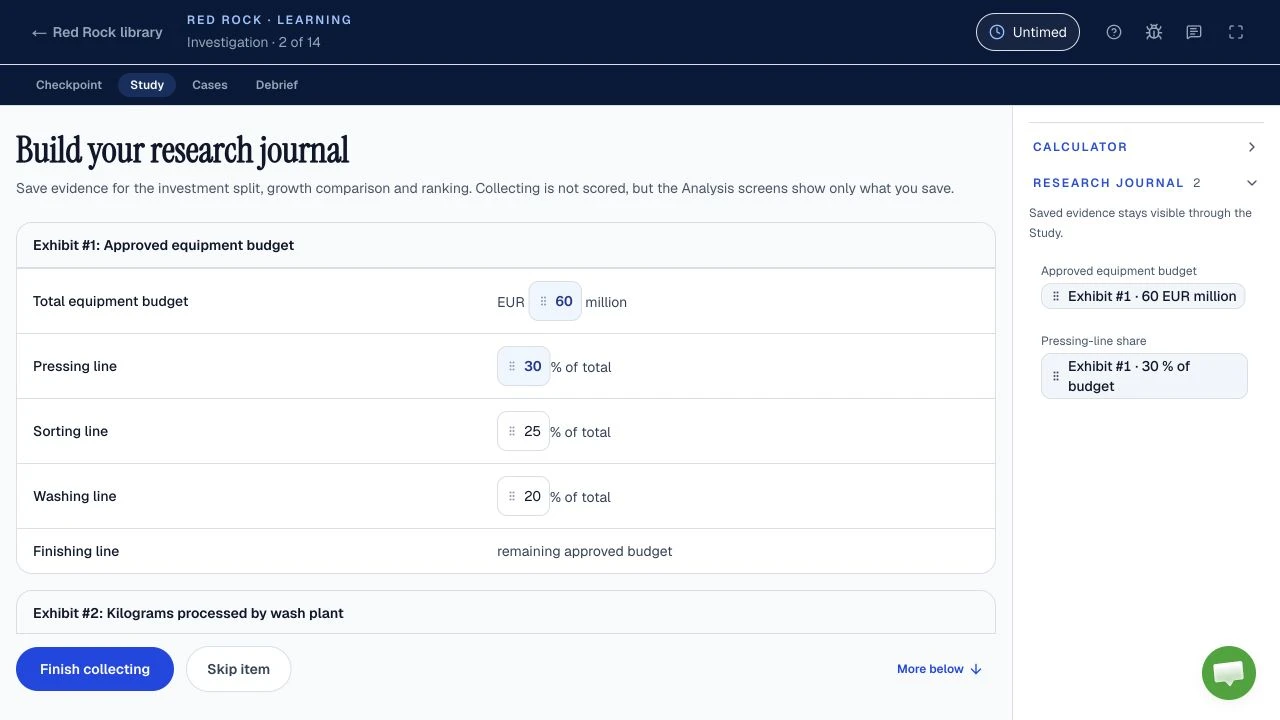
Find in the tutorial: where saved evidence appears, how the calculator opens, where the timer sits, and whether you can go back to an earlier stage. Accounts differ on navigation; some reconstructions describe confirming the Report as closing the Study before the Cases begin. Check this in your tutorial rather than finding out on scored time.
Sea Wolf: site ranges and traits
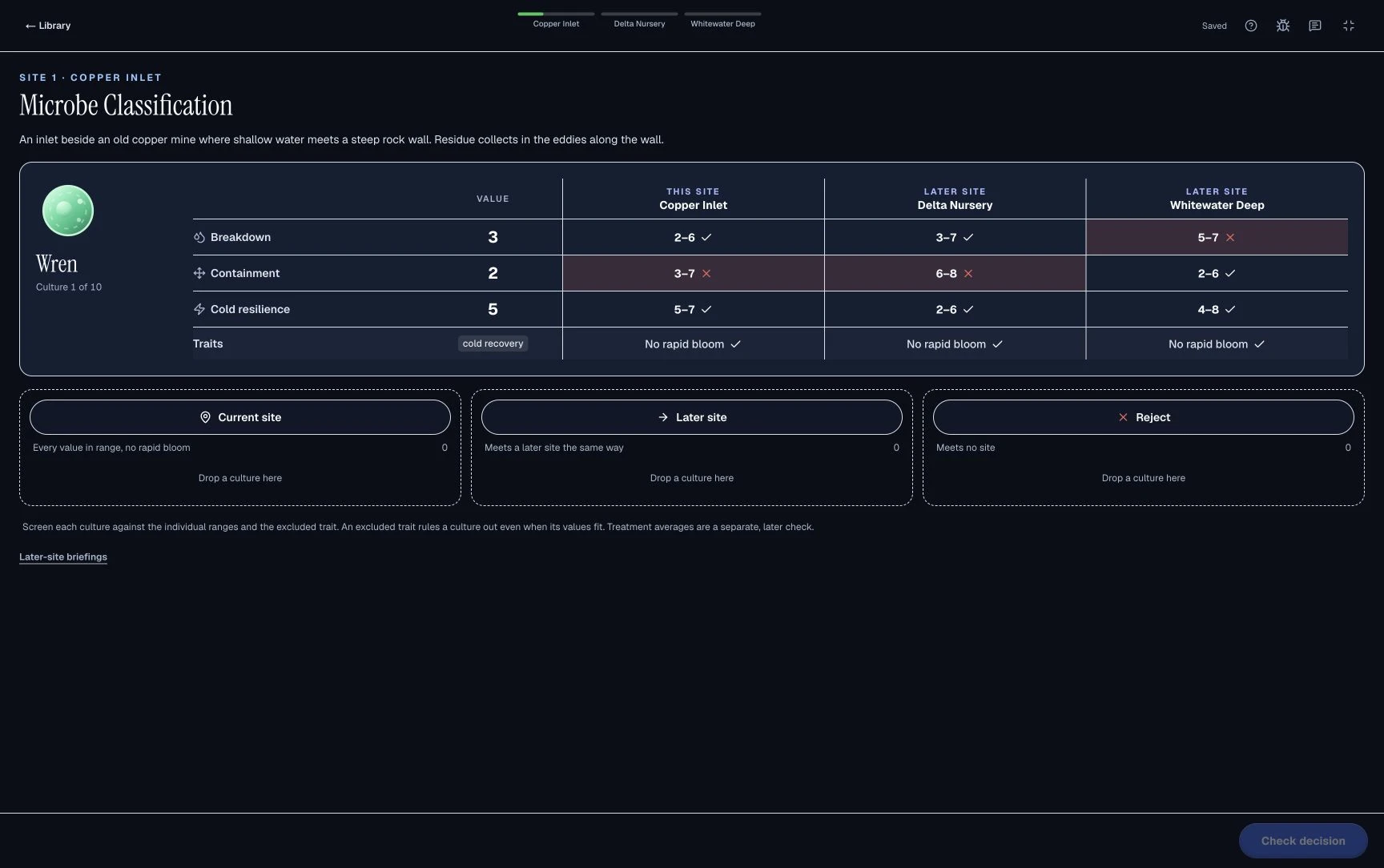
Find in the tutorial: where each site's ranges and required or excluded traits are shown, how you move between sites, and where the treatment's averages are displayed. The Sea Wolf guide explains why a microbe outside a range can still belong in a valid treatment.
Sustainable Futures Lab: one decision at a time
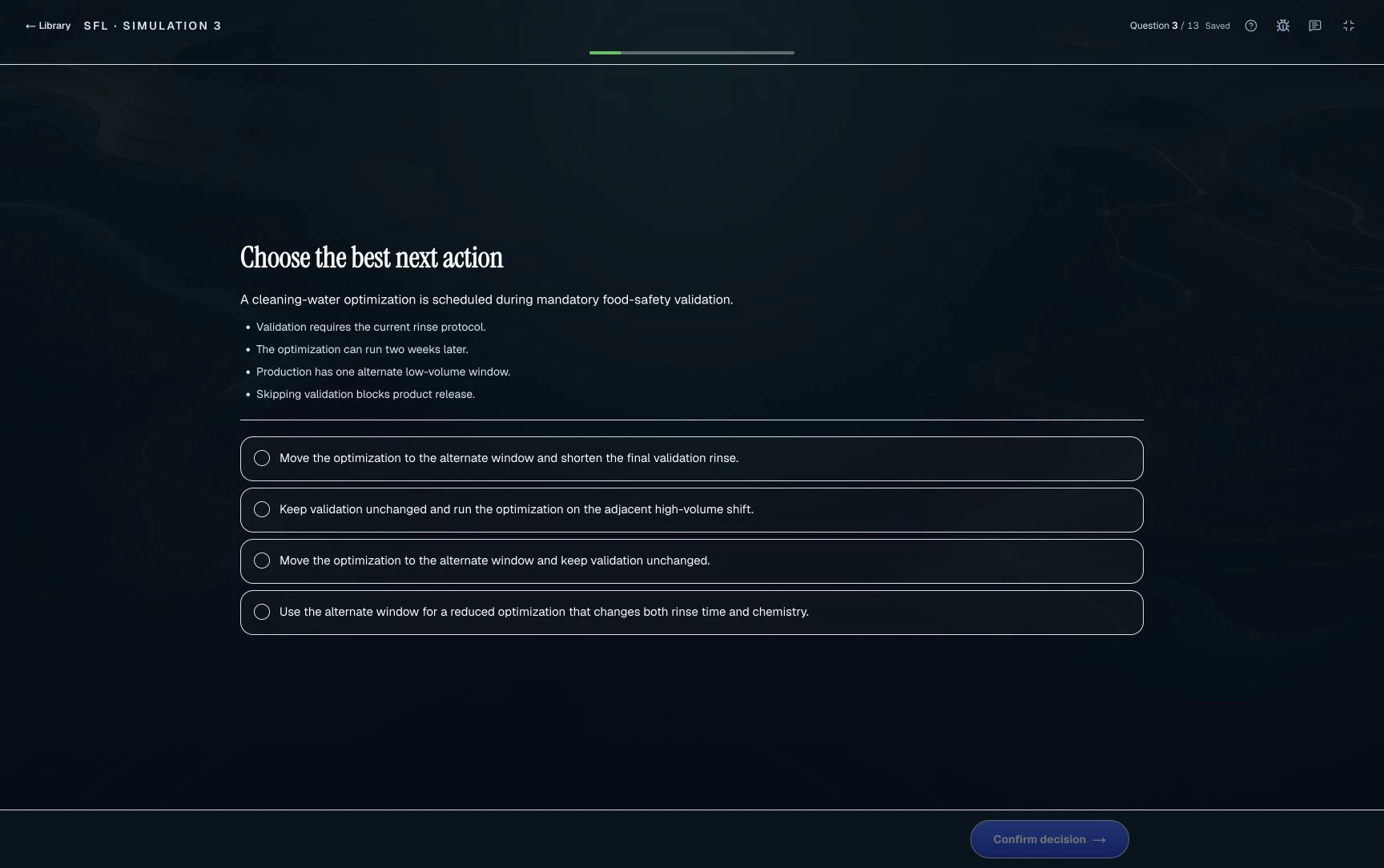
Find in the tutorial: how decisions are confirmed, whether earlier answers stay visible, and in the newer version how the three simulated days are laid out. The SFL guide compares both versions.
How should you pace each McKinsey Solve game?
Pace McKinsey Solve to reach every part of every game: confirm the Red Rock Report by minute 23, be on Sea Wolf site 3 by minute 20, and in the 20-minute standard SFL spend about 2 minutes on the ranking and 1.5 minutes per decision. How unfinished work is scored is not stated, so reaching every part is the safe plan. These checkpoints are coaching budgets derived from the reported timings, not official allocations.
| Game | Arithmetic | Checkpoint |
|---|---|---|
| Red Rock, 35 min | Study 23 min + six Cases at 2 min each (12) = 35 | Confirm the Report by minute 23 even if one blank is a best estimate |
| Sea Wolf, 30 min | 30 ÷ 3 sites = 10 min per site | Be on site 3 by minute 20; take the best valid treatment and move on |
| Standard SFL, 20 min | About 2 min ranking + 18 min ÷ 12 decisions = 1.5 min each | Finish the ranking quickly; it sets the logic for every later decision |
| Newer SFL, 30 min | 30 ÷ 3 simulated days = 10 min per day | Plan each day around its goal before you assign anyone |
The Solve tips guide explains each budget with a worked example, and the Red Rock guide splits the Study into its three stages.
What should you check before starting McKinsey Solve?
Before starting McKinsey Solve, confirm six things: the right link and deadline, a PC or Mac that passes the technical check, a quiet uninterrupted block, the support route, a desk clear of prepared notes, and an updated browser with other apps closed. McKinsey's August 2025 FAQ suggests finding a time slot where you will not be disturbed.
- Correct personal assessment link and written down completion deadline with timezone.
- PC or Mac that passes the technical check through your assessment link. Phones and tablets are not the supported route in the current FAQ.
- Quiet, interruption free room and an uninterrupted block covering the full stated duration plus setup and tutorials.
- Support path saved where you can reach it without searching: technical support for faults, recruiter for application questions.
- Desk cleared of prepared notes. Sound is not required and a mouse is optional per the FAQ, so confirm both during the check rather than assuming.
- Browser updated, unrelated tabs and apps closed, notifications silenced, charger connected.
How does the McKinsey Solve technical check work?
McKinsey's August 2025 Solve FAQ says that after you click your link, a technical check runs before Solve starts and tells you whether your device meets the minimum specification. Sound is not necessary and a mouse is optional, according to the same FAQ. Use the device you intend to take Solve on and follow the check's instructions. If your invitation offers a separate precheck, complete it early enough to resolve issues. Do not assume you can start and re-enter an assessment to test your setup. If the link's behavior is unclear or the check fails, contact support before proceeding.
A useful rehearsal tests the boring failure points: power, connection, browser, notifications, link access and the support route. It does not try to reproduce the live assessment or infer hidden scoring. The official instructions and your own invitation control the real sitting; a preparation site's preferred mouse, browser or room setup is only optional advice.
What should you do if McKinsey Solve freezes or graphics fail?
Contact Solve technical support at the moment the fault happens, by email or live chat. McKinsey's August 2025 FAQ says support can run diagnostics and offer extra time or reset your link, but that it cannot make exceptions to allow a reset if you did not contact support when the issue arose.
Before starting
- 1Open your personal link
- 2Run the technical check
- 3Start only after it passes
Check fails? Contact Solve support before proceeding.
During Solve
- 1Stop repeated clicks or restarts
- 2Note the time and describe the fault
- 3Contact support and follow its instructions
Do not photograph, record, or screenshot the assessment.
On small screens, scroll the table horizontally to compare all columns.
| Problem | Immediate action | Contact | Do not |
|---|---|---|---|
| Technical check fails | Stop before starting and describe the failure | Solve technical support | Start in the hope it resolves itself |
| Graphics stall or a module does not load | Note the time and report it immediately | Solve technical support | Refresh or restart repeatedly; never photograph or screenshot |
| Link or session freezes | Stop repeated clicks and follow support instructions | Solve technical support | Assume you can safely re-enter on your own |
| A fault puts the deadline at risk | Tell support it is time sensitive | Support for the fault; recruiter for the deadline | Assume a support ticket moves the deadline |
Never photograph, screenshot, or record the live assessment to document a fault. The current official rules prohibit recording and screenshots during the real assessment except where McKinsey has approved a written accommodation. Describe the problem in words instead.
Do I need a camera or scratch paper on test day?
Set up as if a camera could be on: one screen, a clear desk, and blank pen and paper for notes and calculations made during the sitting. McKinsey's general assessment-integrity page asks for that setup in assessments and interviews, while the August 2025 Solve FAQ does not mention a camera, so your invitation and the on-screen instructions decide. Red Rock reportedly has an on-screen calculator; a separate calculator app is an outside tool. For the camera question in full, read is McKinsey Solve proctored.
What is allowed during the live McKinsey Solve assessment?
During the live McKinsey Solve assessment you must work alone and may not use applications, websites, AI tools or prepared notes, or record or screenshot any part of it, unless McKinsey has approved a written disability accommodation (Solve FAQ, August 2025). During preparation, all of these are fine.
On small screens, scroll the table horizontally to compare all columns.
| Tool or aid | During preparation | During the live assessment |
|---|---|---|
| Practice sites, guides, videos | Yes, this is what preparation is for. | No. Outside websites are prohibited. |
| AI assistants and chatbots | Yes, for studying concepts. | No. AI tools are prohibited. |
| Prepared notes and blank pen and paper | Prepared notes are fine for study. | Prepared notes are prohibited. McKinsey's general integrity page says to use only pen and paper for live notes and calculations; your invitation and on-screen instructions govern your sitting. |
| Calculator or other apps | Yes, for practice math. | Outside apps are prohibited, except where McKinsey has approved a written accommodation. Use built-in assessment tools only as instructed. |
| Camera and second screen | Use any setup your practice tool allows. | The general integrity page says one screen and camera on; confirm how that applies to your sitting from your invitation or recruiter. |
| Help from another person | Yes, a tutor or peer can teach you. | No. Complete the assessment alone. |
| Screenshots or recordings | Only of practice tools that allow it. | No, unless McKinsey approved it in writing as an accommodation. |
What happens after you submit McKinsey Solve?
Follow the confirmation or next-step instructions you receive. McKinsey says Solve results are considered together with the rest of your application. It does not publish a results timeline, a score scale or a reapplication period, so everything else below is reported, not official.
| Question | Official | Reported |
|---|---|---|
| When do results arrive? | No timeline published | One to four weeks in most accounts from 2024 to 2026, sometimes over a month; unverified |
| An automated email the next day? | Not described | A candidate in September 2025 received a system-generated score-request style email a day after Solve; candidates read it as automatic, not a decision |
| Will I see a score? | No score scale is published | Some candidates describe receiving a score or decile, sometimes after asking a recruiter |
| If rejected, when can I reapply? | No period on the Solve page or FAQ | About 12 months in most accounts, unverified; ask your recruiter |
Silence afterward is not a verdict, and neither is the number of questions you remember finishing. If interviews may follow, spend waiting time on case and personal experience preparation rather than comparing anonymous completion stories. The Solve timeline collects these reports, the retake guide covers reapplying, and the McKinsey Solve score guide explains what a result can and cannot tell you.
A quiet next step: rehearse before test day with one complete free run of each of our four practice formats: Red Rock, Sea Wolf, SFL Classic and SFL Island. Start without an account; create a free account to finish and keep the score, points breakdown and worked feedback on each submitted decision. The free reviews include highlighted calculations and charts in Red Rock, constraint and treatment visuals in Sea Wolf, decision and dependency diagrams in Classic, and evidence chains, placement maps and team feedback in Island. No payment is required for these first runs or their worked reviews. Paid Learning mode provides coaching and feedback at each step across all four formats, untimed in the clocked games, with the matching game pack, Solve pack or Annual access. The free Solve plan asks your invitation length and test date, then gives dated practice steps for up to 28 days; a free account is needed to view and save it. Explore the practice modules when you are ready, not while troubleshooting. For a preparation schedule, use the Solve prep plan.
Sources, dated
Official page: McKinsey digital assessment, checked September 20, 2026. Official FAQ: Solve FAQ (PDF, August 2025), reverified September 20, 2026. General official rules: assessment integrity expectations, checked September 20, 2026. The general page mentions camera use; the Solve-specific FAQ does not, so this guide does not invent a universal sitting-specific answer.
Dated accounts: 95-minute invitations were first reported on August 24, 2026 and a newer 30-minute SFL on September 11, checked October 3, 2026. Results, score and reapplication reports come from candidates and are unverified; the timeline guide collects them. Game structures and timings are reported, not McKinsey specifications.
Third-party setup advice is treated as unverified, not authority. Pacing checkpoints are our coaching arithmetic from the reported timings. Where third-party advice conflicts with official rules, this guide follows the official material and your personal instructions.