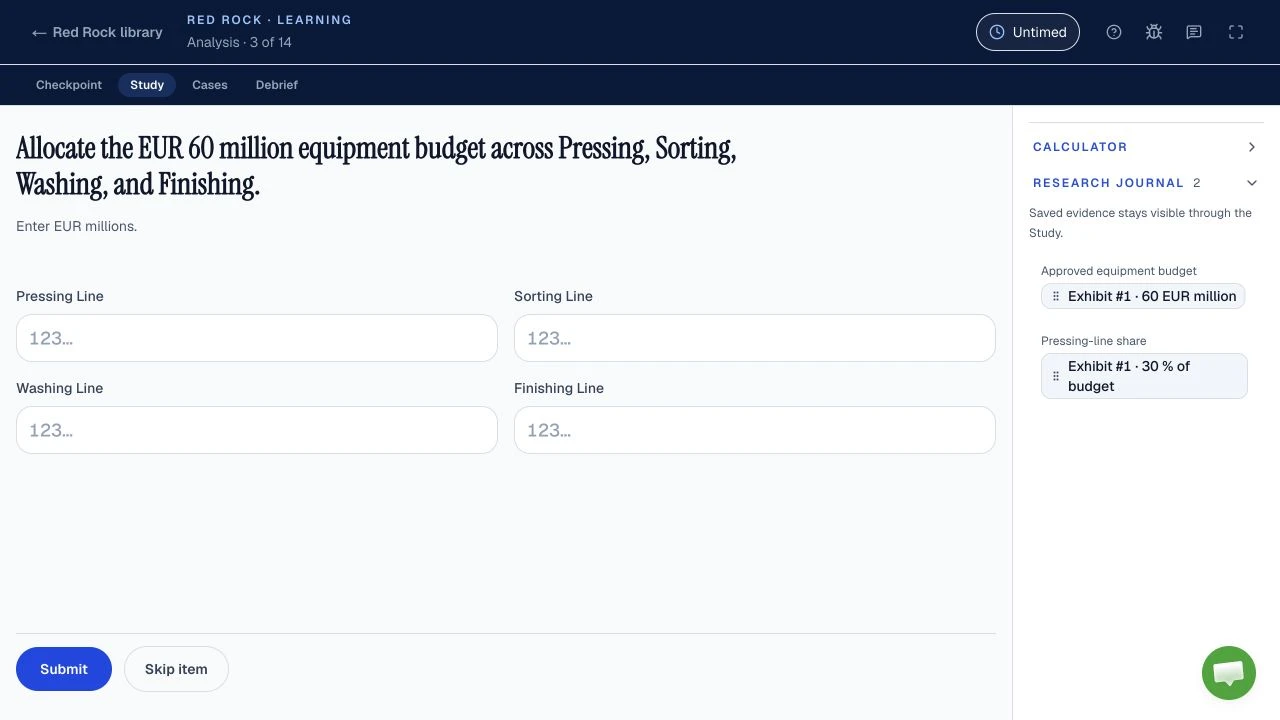
Red Rock mistakes usually start before the arithmetic: you choose the wrong base, unit, evidence or requested output. The seven worked pairs below are coaching examples on fictional data, not measured McKinsey error frequencies. McKinsey does not publish Red Rock marking rules, so no public source can say how many points a particular mistake costs.
| Question | Answer | Status |
|---|---|---|
| Does McKinsey publish a Red Rock error ranking? | No ranking appears in the public Solve sources checked. | Not published |
| Are Red Rock stages and a shared clock documented by McKinsey? | Candidates report one Study and six Cases on a shared clock; follow your own tutorial. | Reported |
| Does each Solve task have an untimed tutorial? | McKinsey says yes, and says the invitation states the total assessment length. | Official, Solve FAQ |
| Does one error reveal your outcome? | McKinsey says Solve is one factor alongside the rest of an application; it gives no per-error penalty. | Official for use of result; penalty not published |
What mistakes should you check first after a Red Rock practice run?
Check seven Red Rock error types against your own practice work: wrong base, percent versus percentage points, unit scale, averaging rates, irrelevant evidence, answering a different question, and early rounding; this is our diagnostic method, not a McKinsey ranking. Start with the earliest input or interpretation that changed your answer, because repeating arithmetic will not fix a wrong exhibit. The Red Rock format and practice guide covers the reported format and a separate wetland exercise; this page follows one new study through seven errors.
Original fictional study: a restoration team planted seedlings in two zones, Arroyo and Mesa. “Thriving” is the count still thriving at the end of each observation year. The two yearly cohorts differ in size, so a count, a survival rate and a change in rate answer different questions. Water saved and visitor traffic sit in separate exhibits. These numbers are invented for teaching, not from Solve, a candidate sitting or a Road to Offer run.
| Zone | 2024 planted / thriving | 2025 planted / thriving | 2025 water saved, ML |
|---|---|---|---|
| Arroyo | 50 / 20 | 100 / 55 | 0.42 |
| Mesa | 150 / 105 | 53 / 35 | 0.18 |
- Arroyo
- Mesa
Fictional counts only. Each year's cohort has a different planted total, so this exhibit alone cannot answer a survival-rate question.
The visitor exhibit records 2,400 visits. ML means megalitres, and the conversion used in this exercise is 1,000,000 litres per ML. Before calculating, write the question as “quantity, period, population, unit.” If the live task uses a different definition or unit, its tutorial and question control your answer. For the wider difficulty picture, see where Solve feels hard; for the same operations worked without the traps, see the eight worked Red Rock calculation types, which use a different survey.
- Copy the requested output. Count, rate, difference in points or relative change?
- Attach the source label. Which zone, year, cohort and unit does each input describe?
- Choose the base. Growth uses the starting count; a survival rate uses planted seedlings.
- Calculate, then format. Preserve precision until the question asks you to round.
Our coaching sequence for the fictional exercise. McKinsey publishes no Red Rock marking rubric.
How does the wrong base change a Red Rock growth answer?
In our fictional Arroyo count question, growth is 175% because the starting thriving count is the base; dividing by the ending count gives 63.64%, a wrong answer for growth from 2024 to 2025, and McKinsey publishes no penalty for this error. The requested quantity is the change in thriving seedlings relative to 2024, so set up “ending minus starting, divided by starting” before entering values. This is a mathematical definition used in our original exercise, not a claim about McKinsey scoring.
+35 seedlings
The question says “grew from 2024”, so the 2024 bar is the one the increase is measured against.
Growth from 2024 to 2025
Tempting wrong answer
Divides the increase by the 2025 count. That is the new seedlings as a share of the ending total, a different ratio.
Right setup
Divides by the 2024 count, the base that “grew from 2024” names.
Invented data and arithmetic; not an official Red Rock question.
The exception is a question that explicitly asks what share of the ending count is new; then the ending count can be the correct denominator. Here the word “grew” and the comparison “from 2024” establish the base. A calculator can execute either fraction, so confirm the denominator first. The Solve tips guide gives a shorter check you can use across games.
When is a Red Rock change in percentage points instead of percent?
Arroyo’s fictional survival rate rose by 15 percentage points, from 40% to 55%; the relative increase is 37.5%, which answers a different question in this original exercise, not a published McKinsey scoring rule. A percentage-point change subtracts rates. A percent change divides that difference by the starting rate. Neither is interchangeable, even when both are calculated correctly.
Each rate pairs thriving seedlings with the seedlings planted in that same year's Arroyo cohort.
Survival rate, thriving over planted
Both bars are already percentages on one scale, so the distance between them is read in points.
Wrong for “how many points”
Divides the gap by the 2024 rate. That is the relative increase in the rate, which is right only when the question asks for it.
Right for “how many points”
Subtracts one rate from the other and labels the result in percentage points.
McKinsey has not released a Red Rock question bank to establish that this particular wording appears. This is a transferable rate-reading drill, separate from any claim about the real test. The scores and results guide explains why a plausible answer cannot be turned into a guessed score.
How can a unit or scale slip spoil a Red Rock calculation?
In our fictional water exhibit, the zones saved 0.60 ML together, or 600,000 litres; reporting 600 litres would use a thousandfold smaller conversion, with no published McKinsey penalty attached to this example. Add the two values only after confirming they share the same unit, then convert the combined result once. The exhibit's axis, not your memory of the question, tells you which unit the bars are in.
The axis unit is megalitres. One ML is 1,000,000 litres in this exercise, so a bar that looks small is a large volume.
Add in the exhibit's unit first
Tempting wrong answer
Multiplies by 1,000, the factor for a different scale. The answer is 1,000 times too small.
Right setup
Multiplies by 1,000,000, the litres in one megalitre, after adding in ML.
If the prompt requests ML, stop before converting and answer 0.60 ML. Write units beside journal entries rather than relying on memory; the Red Rock calculator and journal guide shows which values are worth saving and which to compute fresh. The test-day checklist separates permitted on-screen controls from outside aids.
Why is averaging two zone rates wrong for an overall Red Rock rate?
The fictional combined 2025 survival rate is 58.82%, found from 90 thriving out of 153 planted; the simple average is 60.52% and gives unequal cohorts equal weight, but McKinsey publishes no partial-credit rule for such an error. Arroyo's cohort has 100 planted seedlings while Mesa's has 53. “Overall” asks for the pooled numerator divided by the pooled denominator.
- Arroyo100 · 65.4%
- Mesa53 · 34.6%
- Both zones153 · 100%
Arroyo supplies about 65.4% of the planted seedlings, so the overall rate sits closer to Arroyo's.
Pooled rate across all 153 planted seedlings: 58.82%
Overall rate: pool the counts, then divide
Shown to two decimals.
Tempting wrong answer
Gives Mesa's 53 seedlings the same weight as Arroyo's 100. It answers “average zone rate”, not “overall rate”.
Right setup
Adds numerators and denominators first, so every planted seedling counts once.
The simple average is useful if the question explicitly asks for the average zone rate and each zone should have equal weight. It is not the rate across all planted seedlings. This is the same choice of unit of analysis that appears in the separate Red Rock workbook, but the cohorts and the answer here are new. McKinsey does not publish whether any specific aggregation method receives partial credit.
What happens when you use an irrelevant Red Rock exhibit?
For the fictional overall survival question, the visitor exhibit is irrelevant: dividing 90 thriving seedlings by 2,400 visits yields 3.75%, while the planted-seedling denominator yields 58.82%; this is our constructed error, not an official Red Rock trap. The wrong fraction is arithmetic on real entries in the study, but it mixes different populations. It cannot describe seedling survival.
The largest total on the page counts people, not seedlings. Size does not make a number the base.
Tempting wrong answer
Divides seedlings by visits. The inputs are real entries in the study, but the result describes no population.
Right setup
“Of planted seedlings” names the population, so the planted total is the base.
Name the population before choosing the exhibit. Visitor traffic could be relevant to a question about visits or visitor impact, but that would need its own defined measure and evidence. A descriptive exhibit may also explain context without entering a formula. This is our evidence-selection rule, not a claim that the real interface deliberately includes a visitor trap.
Candidates report using a Research Journal in Red Rock, but McKinsey's public materials do not specify its controls or scoring. Treat the Solve prep plan as a place to schedule evidence-selection drills, then let your live tutorial set the interface rules.
How do you catch an answer to a different Red Rock question?
If our fictional prompt asks for Mesa’s 2025 survival rate, the answer is 66.04%, not Arroyo’s 55 thriving seedlings; both numbers can look plausible without labels, but this is an original reading drill rather than a known McKinsey question. Circle the requested zone, period, measure and unit before calculating. The count exhibit and the rate rank the two zones in opposite orders, which is why the nearest prominent number is tempting.
The count exhibit. Arroyo has more thriving seedlings, but it also planted more.
The requested measure. Mesa is higher once each count is divided by its own planted total.
Fictional data. The highlighted bar is the zone the question names.
Answers another question
Copies the nearest prominent number: wrong zone, and a count where a rate was requested.
Answers this question
Goes back to Mesa's 2025 row and divides thriving by planted.
If the prompt asks for a count, do not add a percent sign; if it asks for a chart of change over time, do not substitute a one-year snapshot. These are reading checks, not claims about a fixed real Red Rock question set. The guide to what Solve measures in each game explains why reading the request precisely is part of the reported task, and the invitation-length guide handles which games are reported in each assessment length. Neither tells you what an individual Red Rock prompt requests; that detail must come from the screen in front of you.
Why should you round only at the end of a Red Rock calculation?
On our fictional projection of 1,000 future plantings, keeping the underlying pooled rate at full precision gives 588.24 expected thriving seedlings when displayed to two decimals and a final rounded answer of 588; rounding the rate first to 59% gives 590, with no published McKinsey tolerance implied. This is a hypothetical arithmetic exercise, not a prediction or a McKinsey rounding rule.
Projection at full precision
- Rounds to 588587.5 to 588.5
- Rate kept at full precision588.24Inside
- Rate rounded to 59% first590Outside
Rounding the rate early moves the projection by 2 seedlings. Whether that matters depends on the precision your own screen asks for.
Rounds early
Rounds 58.82% up to 59% and then scales the rounding error by 1,000.
Rounds once, at the end
Carries the fraction through the multiplication and rounds only the final seedling count.
The exception is a prompt that specifies an intermediate rounding step or asks for an approximate answer with a stated precision. Follow that instruction. Otherwise, retain the calculator's full value and round once at submission. The public McKinsey sources do not publish a universal tolerance for Red Rock numeric answers. For the broader timed-game habits, focus on a single final check rather than repeatedly reworking every figure, and use the Red Rock time budget to decide how long that check can take.
How can you diagnose your own Red Rock errors after practice?
After an independent Red Rock run, compare the first point where your working diverged from the answer key, then choose one drill from this table; this is our coaching method, not an official error report. Record the question, your selected inputs, the formula and the requested unit. A final answer alone cannot show whether you used a wrong exhibit, a wrong operation or a correct method with a typing slip.
| Symptom | Likely check | Next drill |
|---|---|---|
| Answer differs by a base | Starting versus ending count | Write the base in words before dividing. |
| Correct digits, wrong “%” label | Percent change versus percentage points | Answer both versions of the same rate question. |
| Magnitude is far off | ML versus litres, or another unit | Write and check the conversion beside the result. |
| Overall rate sits between zone rates but disagrees | Unweighted average versus pooled counts | Add numerators and denominators before dividing. |
| Formula uses a prominent unrelated total | Wrong exhibit or population | Cross out inputs that do not match the question. |
| Plausible value, wrong label | Different zone, year or requested measure | Underline quantity, period, population and unit. |
| Close numeric result | Early rounding | Repeat with full precision until the final entry. |
Work the six worked Red Rock mini-cases or use the practice chooser for an independent Red Rock run, then return to the row matching your miss. The completed free run includes your score, where points went and worked feedback on each submitted decision, with highlighted calculations and charts; no payment is required for this first run or its worked review. Red Rock is one of four practice formats we offer, alongside Sea Wolf, SFL Classic and SFL Island, each with a complete free run. Paid Learning mode provides coaching and feedback at each step, untimed in the clocked games, with the matching game pack, Solve pack or Annual access. The separate free Solve plan uses your invitation length and test date to give dated practice steps for up to 28 days; create a free account to view and save it. Do not treat a simulator answer as a prediction of your official score. McKinsey says each task starts with an untimed tutorial and that scenarios vary, so check the actual prompt and controls each time. If your miss was caused by pressure rather than a specific formula, the Solve timeline and test-day guide cover preparation and setup outside this calculation drill.
Red Rock is not the only game where one early slip carries through: the Sea Wolf mistakes guide does the same diagnosis for the microbe task, and Red Rock versus Sea Wolf helps you decide which to practise first. For short answers on rules and logistics, use the Solve FAQ. If you are worried about what happens after a weak sitting, the retake and reapply guide separates what McKinsey states from what is only reported.
Sources and evidence boundaries
- Official, checked October 11, 2026: McKinsey's Solve assessment page describes the assessment and says its result is considered with the rest of an application. The August 2025 Solve FAQ says each task has an untimed tutorial, the invitation states total length, scenarios vary, and outside aids and screenshots are prohibited. The assessment integrity rules cover permitted materials more broadly.
- Reported, unverified: candidates describe Red Rock as a Study followed by standalone Cases, with a Research Journal and an on-screen calculator. McKinsey does not publish that module blueprint in the sources above. Your invitation and live tutorial control your sitting.
- Original teaching material: the restoration dataset, wrong answers, corrections, projection and diagnosis method on this page are fictional, and their calculations were checked separately. They are not McKinsey questions, candidate results or observed error frequencies.
- Not published in the checked sources: Red Rock partial-credit rules, scoring weights, error penalties, pass mark, per-error frequency, rounding tolerance and a candidate-facing breakdown. No calculation here can establish how McKinsey grades a real response.